 JianyingAPK
Jianying vs CapCut: What Actually Differs Between the Two Editions
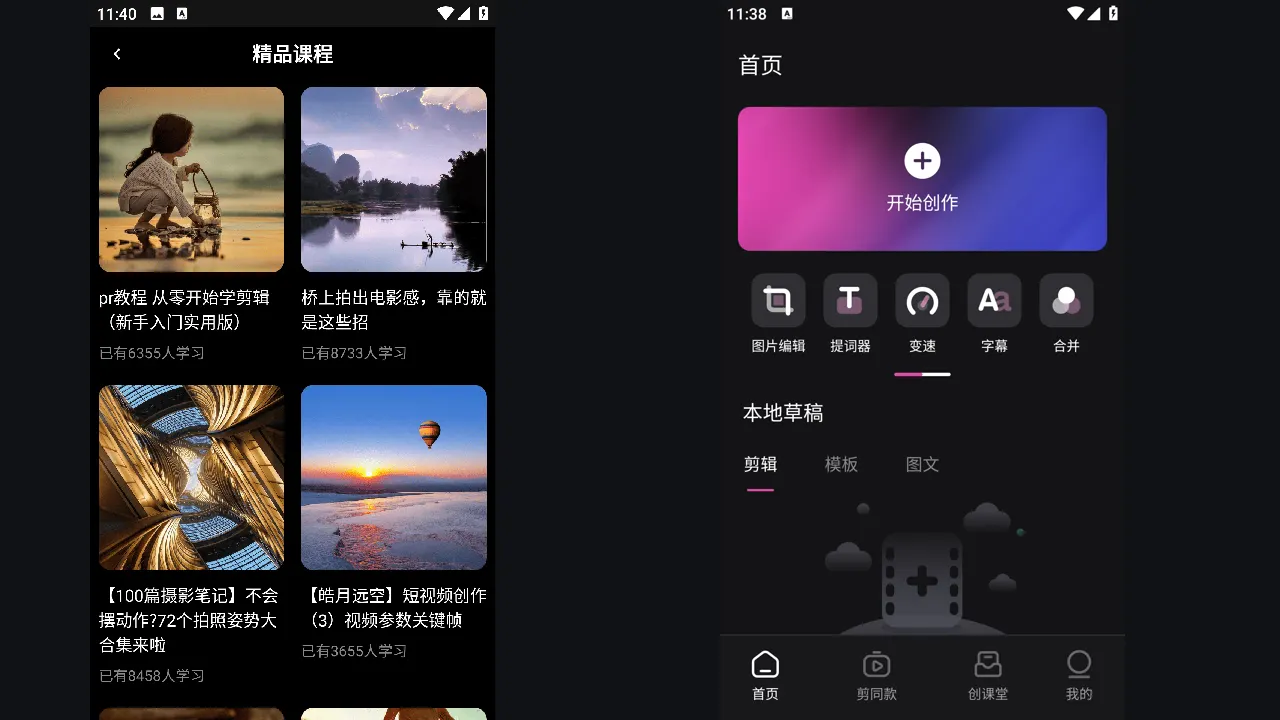
Jianying and CapCut are two editions of the same ByteDance video editor. Jianying is the domestic Chinese edition, first released in 2019, while CapCut is the international edition that followed in 2020. Under the surface they share a timeline, tools and project model, which is why tutorials for one so often work in the other.
The differences that matter are catalogue, language and timing. This comparison walks through each one honestly, so you can decide which edition fits your audience, your language and the kind of videos you publish. If you are new to the app, start with the Jianying APK page for the verified facts, screenshots and download information, then come back to this guide.
Same engine, different shelves
Open both apps and the editor feels familiar: media bin, preview and a multi track timeline with the same trimming, speed, text and audio tools. Keyframes, chroma key, captions and cutout work the same way. What changes is what fills the shelves. Templates, stickers, fonts, music and effects are licensed and curated per market, so a trending template in one edition may never appear in the other.
For most creators the tools are never the deciding factor. The deciding factor is whether the sounds, templates and text styles your audience recognises live in your edition's catalogue this month.
Language and audience fit
Jianying's interface is in Chinese, with a catalogue built around Douyin trends, Chinese fonts and domestic music licensing. CapCut presents an English first interface for international audiences and the TikTok ecosystem. If you edit for a Chinese speaking audience, Jianying feels native in every menu and template. If your viewers are international, the other edition's text styles and sounds will usually land better.
Creators who work across both audiences often keep Jianying for its earlier features and larger template pool, then mirror finished formats for their international channels. The shared workflow makes that practical without relearning an editor.
Readers working through this topic usually also need our walkthrough on jianying templates: find, customise and reuse winning formats, which covers the neighbouring step in the same workflow.
Release timing and features
New tools frequently appear in Jianying first, because it is the home edition where the team ships and tests at the largest scale. AI tools, new effects and editing experiments often spend weeks or months there before travelling. That early access is the main reason international creators seek out the Jianying APK even with a Chinese interface.
The trade off is polish for your market: prompts, help text and some AI features assume Chinese input. Speech tools are tuned Mandarin first, though English recognition and text to speech both work. Decide based on whether early features or local polish matters more to your channel.
Which edition should you use?
Choose Jianying if you want the deepest template library, the earliest features and you are comfortable navigating a Chinese interface with icon led tools. Choose the international edition if English menus, local music licensing and TikTok facing templates matter more. Many professionals install Jianying as their experimental bench and publish from whichever edition holds the right catalogue for a given video.
Two more guides round out this workflow: how to install jianying apk on android, step by step and jianying auto captions: how to generate and style subtitles. Together they cover the steps before and after this one, so a full project never stalls on a missing piece.
A final note from our reviewer
One last practical note from our bench: keep both editions signed in only if you truly publish for both audiences. Every extra account link is another sync prompt and another catalogue to maintain, and the cleanest setup we tested was one main edition per channel, with the second edition reserved for the specific templates or early features a series genuinely needs.
Frequently Asked Questions
Are Jianying and CapCut the same app?
Can I open a Jianying project in the other edition?
Why do features appear in Jianying first?
Victor Liang
Victor Liang has spent nine years cutting short form video for creators and small studios, and he tests every editor on this site on real Android phones before a download page goes live. His bench work focuses on timeline performance, caption accuracy, export quality and how an app behaves on mid range hardware. More about Victor Liang